GRCP-03
A living GRC workbook for the HIPAA Security Rule
A risk register with inherent and residual scoring, cross-walked to the HIPAA Security Rule and the evidence behind each control, maintained alongside a cloud migration rather than after it.
At a glance
- Role
- Sole builder and assessor
- Effort
- A couple of hours to build; a few weeks to assess
- Framework
- HIPAA Security Rule (45 CFR 164.308–164.312)
- Tools
- Excel, Python (openpyxl)
Executive summary
Organizations that handle health information have to be able to show their work: which risks they’ve identified, how serious each one is, what they’re doing about it, and where the proof lives. Large companies buy GRC platforms for this. Small ones usually have scattered documents and good intentions.
I built a lightweight GRC workbook to close that gap for a small, HIPAA-regulated firm in the middle of moving to a cloud-first model. It has two working parts: a risk register that scores every risk before and after mitigation, and a control mapping that ties each safeguard to the HIPAA Security Rule citation it satisfies and the evidence that proves it.
Building the workbook took a couple of hours. The real work was the assessment: a few weeks of evaluating risks and controls with one person as the only resource. The result is a single document that serves as risk analysis, compliance tracker, and audit evidence index.
Why build it
This was my own initiative. The firm was rebuilding its identity and device stack in the cloud, and every phase of that project created decisions with compliance consequences: controls finished, controls deferred, trade-offs accepted on purpose.
Those decisions needed to be recorded as they happened, not reconstructed months later for an auditor. The HIPAA Security Rule requires an ongoing risk analysis and risk management process (45 CFR 164.308(a)(1)), not a one-off report. So the workbook was designed from the start to run in parallel with the project plan, as a living log.
How the workbook is structured
The workbook has three tabs:
| Tab | Purpose |
|---|---|
| Read Me | Purpose, how to use it, the scoring method, and regulatory notes. Anyone who opens it can maintain it. |
| Risk Register | Every identified risk, scored before and after mitigation, with an owner, a status, and a review date. |
| HIPAA Control Mapping | Each Security Rule citation, the control that satisfies it, its status, and the evidence that proves it. |
Each register row captures the risk ID, date identified, category, a plain-language description, the affected system, the inherent likelihood and impact, the mitigation, the residual likelihood and impact, the owner, the status, a target or review date, the related HIPAA citation, and notes.
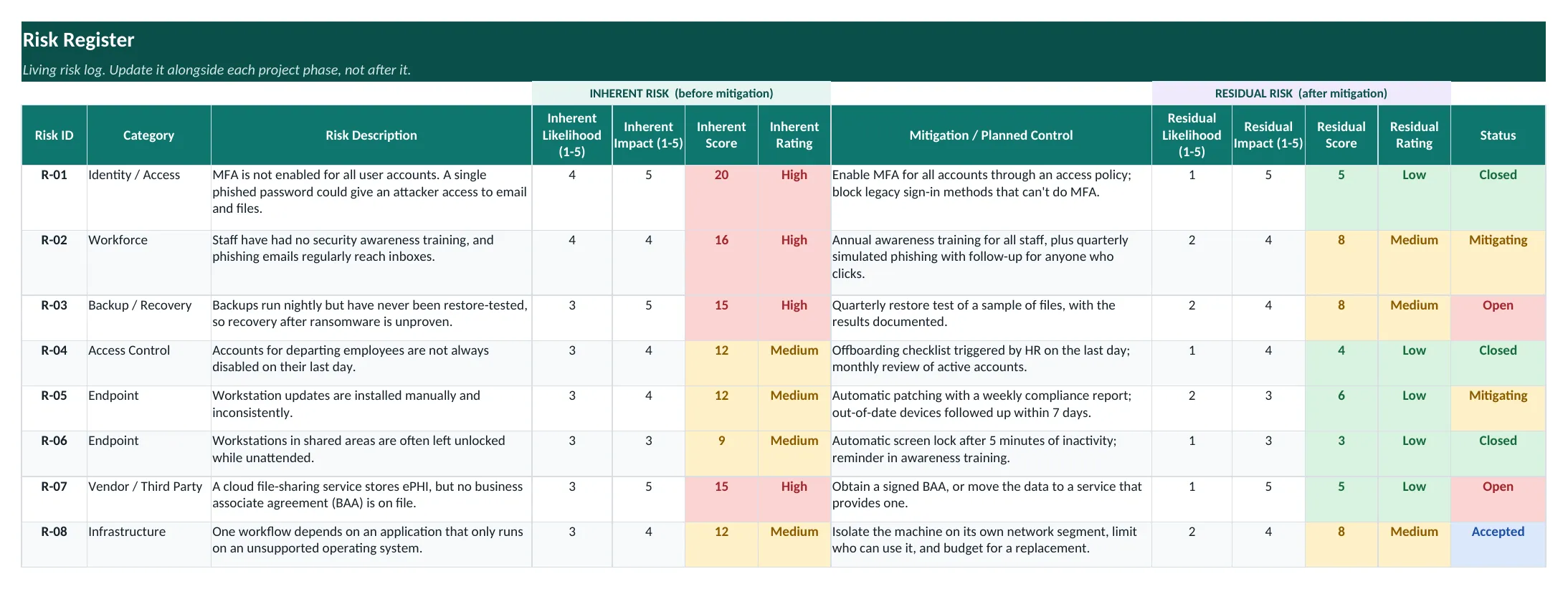 Figure 1. The risk register, shown here with example data from the free template. The color shift from the inherent score to the residual score is the point: it shows what each mitigation buys.
Scoring: inherent vs. residual
Likelihood and impact are each scored from 1 (low) to 5 (high), and the score is calculated automatically as likelihood × impact:
| Score | Rating |
|---|---|
| 1–6 | Low |
| 8–12 | Medium |
| 15–25 | High |
Each risk is scored twice: once for inherent risk, before any mitigation, and once for residual risk, after the mitigation in place today.
The gap between the two scores is your case for why a mitigation matters, or why more work is still needed.
That one design choice changes how the register is used. A high inherent score with a low residual score justifies the time spent on the control. A residual score that stays high is a clear signal that the work isn’t finished, and it’s hard to ignore when it’s shaded red.
Mapping controls to the Security Rule
The second tab is a crosswalk from the HIPAA Security Rule to the firm’s actual controls. Each row records:
- the citation (for example,
164.312(d), Person or Entity Authentication), - the safeguard type: administrative, physical, or technical,
- whether the specification is required or addressable,
- the control implemented or planned, and its status,
- the evidence artifact that would demonstrate it in an audit: a procedure document, a policy configuration, an alert record, a log,
- and the risk ID it relates to, so either tab can be read in light of the other.
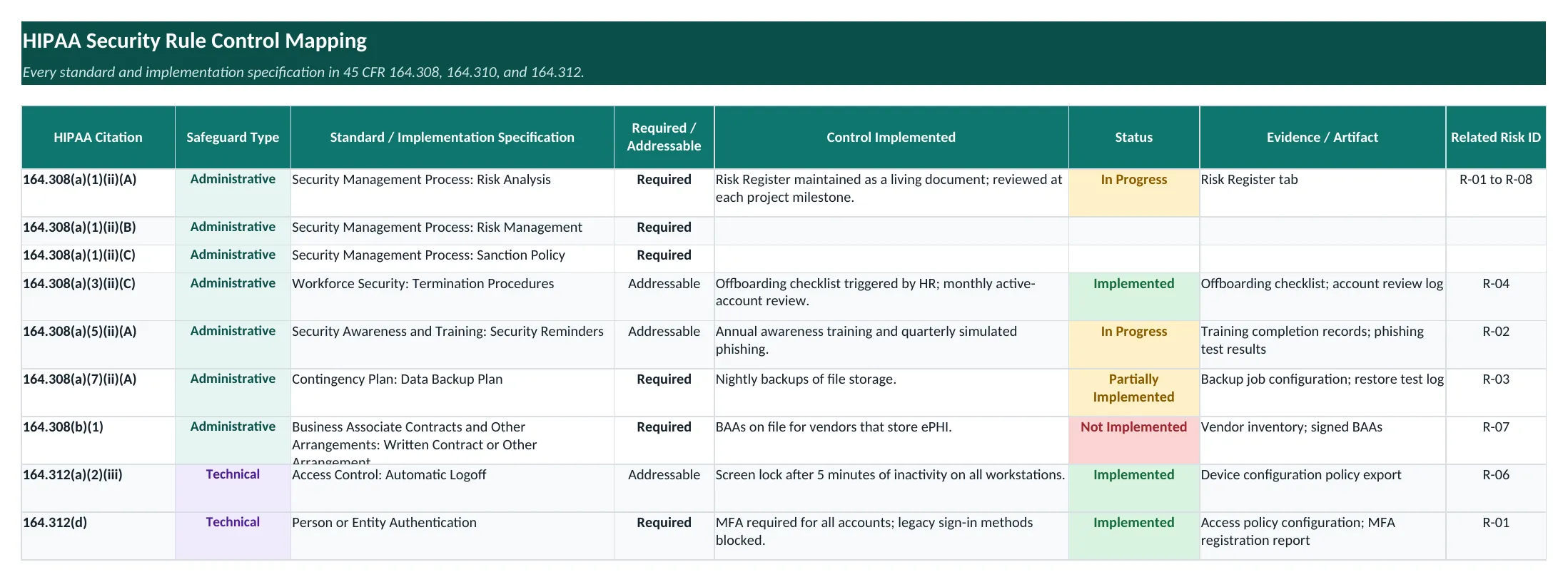 Figure 2. The control mapping in the template. Every control points to its evidence and back to the risk it treats.
The evidence column does the most work. “We do that” isn’t evidence. “Here’s the policy export, and here’s the alert test record” is. Writing down where the proof lives while building the control means an audit or a client security questionnaire becomes a lookup exercise, not a scramble.
Keeping it alive
A register that’s only updated once a year is a snapshot. The workbook comes with four working rules:
- Log the risk before building anything. Every new piece of work starts with a register row for the risk it addresses or introduces.
- Close the loop when the work is done. Update the control mapping and link it back to the risk ID it reduces or closes.
- Record trade-offs explicitly. When a control is deferred or a risk is accepted, it gets a row, a reason, and its compensating controls, so a deliberate decision is never mistaken for an unmanaged gap.
- Review at every milestone, not just annually.
A risk’s full lifecycle
One example shows the process end to end. Early in the assessment, the highest-scoring finding was standing, shared administrator access held by a third-party IT provider: access that wasn’t attributable to a person, wasn’t time-limited, and wasn’t easy to revoke. It scored High.
The planned mitigation was recorded in the register: replace the shared accounts with scoped, time-limited delegated admin access (Microsoft’s Granular Delegated Admin Privileges, or GDAP), and then remove the shared accounts. The mitigation was implemented, the residual score dropped to Low, the related control-mapping row moved to Implemented with its evidence noted, and the risk was closed.
The technical change itself was quick. What the register added was everything around it: the risk was scored, prioritized above the rest, owned, tracked to a target date, and closed with evidence behind it.
Built-in guardrails
A spreadsheet is only as reliable as what people type into it, so the workbook constrains the inputs:
- Dropdowns (data validation) for category, status, safeguard type, and required vs. addressable, so filters and counts stay consistent.
- Whole-number validation limits scores to 1–5.
- Formulas calculate every score, so nobody does the arithmetic by hand.
- Conditional formatting shades the scores, so the riskiest rows stand out. (The template also color-codes control status.)
- Excel tables and frozen header panes keep it usable as it grows.
It’s built with Python and openpyxl, so the structure can be changed or regenerated in code instead of by hand. The free template below is generated the same way.
Results
The firm now has a single, maintained source of truth for its HIPAA risk analysis and risk management: risks scored before and after mitigation, controls tied to specific citations, and evidence referenced for each one. The highest-rated finding from the initial assessment has been mitigated and closed, and the remaining items have owners, statuses, and review dates.
Lessons learned
- The spreadsheet is the easy part. Building the workbook took hours; assessing honestly took weeks. The value is in the evaluation, not the tool.
- Record the evidence while you build. Noting where the proof lives at the moment a control is implemented costs seconds. Reconstructing it for an auditor later costs days.
- Two scores beat one. Scoring inherent and residual risk separately turns “we should do this” into a visible, defensible before-and-after.
- A deliberate trade-off still deserves a row. Writing down accepted risks and their compensating controls is what separates a decision from a gap.
What’s next
- Keep it current as the cloud migration moves through its remaining phases.
- Watch the proposed HIPAA Security Rule changes. The January 2025 proposed rule would remove the distinction between required and addressable specifications and make safeguards like MFA and encryption mandatory. The workbook reflects the rule as currently in force, but the required/addressable column makes it easy to see which rows would tighten.
Get the template
The Risk register + HIPAA control mapping template in the Downloads box is free. It follows the same structure as the workbook described here, with a few additions:
- a Summary tab that updates itself, with risk counts by status, an inherent-risk heatmap, the shift from inherent to residual ratings, and control coverage,
- Low / Medium / High ratings next to every score, plus color-coded statuses,
- example risks for a fictional company, such as MFA not enabled for all accounts and backups never restore-tested, each with its mitigation,
- and every standard and implementation specification in 164.308, 164.310, and 164.312, already listed and marked required or addressable.
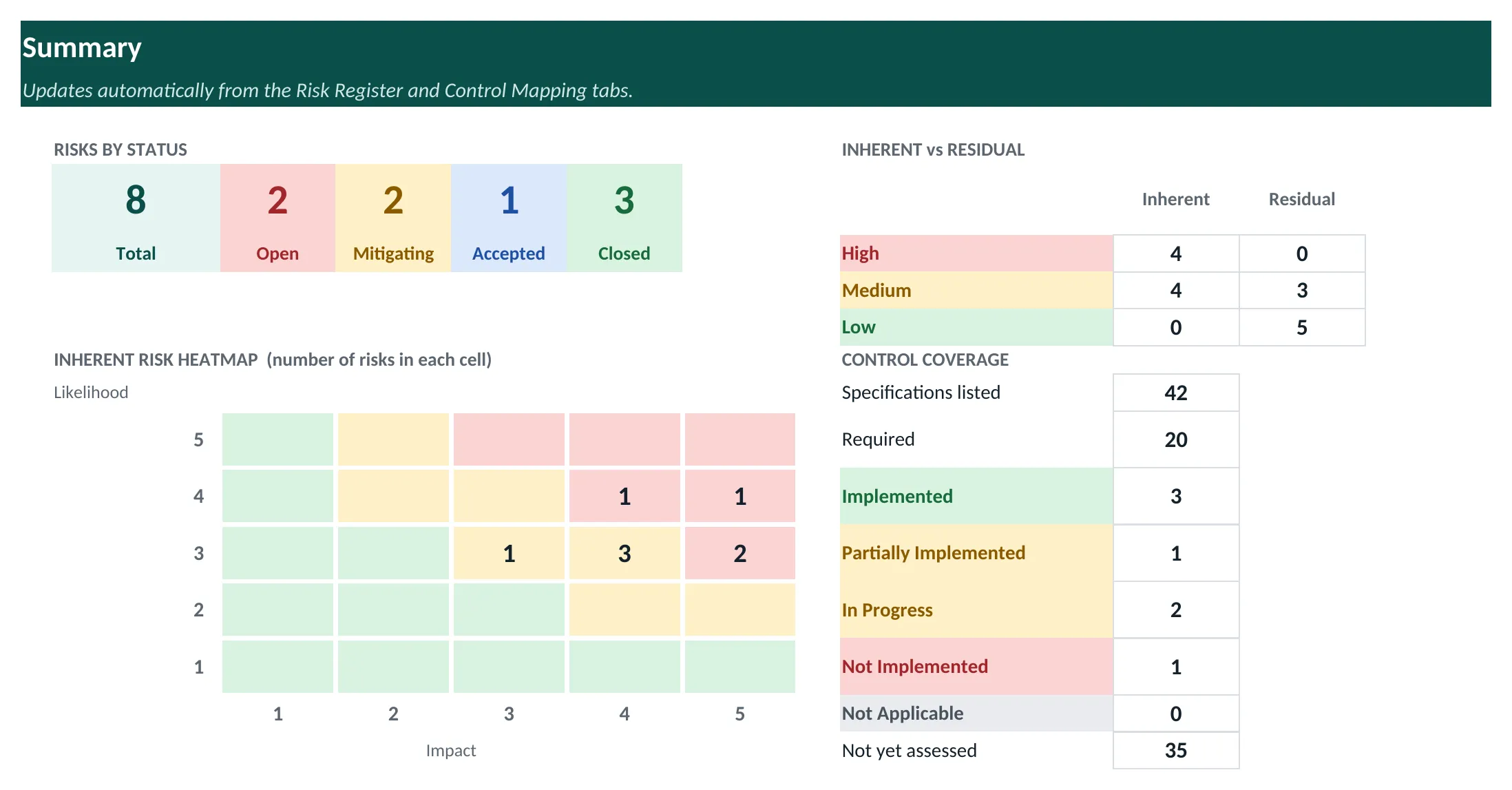 Figure 3. The template’s Summary tab. Every number is a formula, so it stays current as you add rows.
Replace the examples with your own and start logging.
The template is a starting point, not legal or compliance advice.